A well-designed office is not only about desks, chairs, storage, and technology. Lighting has a major influence on how comfortable the space feels throughout the working day and how easily people can read, use screens, move around the room, and stay focused on detailed tasks.
Poorly planned lighting can create glare on monitors, leave work surfaces in shadow, or make an otherwise attractive office feel flat and tiring. On the other hand, a thoughtful combination of natural light, ambient illumination, and focused task lighting can make both commercial offices and home workspaces considerably more pleasant to use.
The most effective approach is to plan lighting according to activities rather than simply trying to make the entire room equally bright.
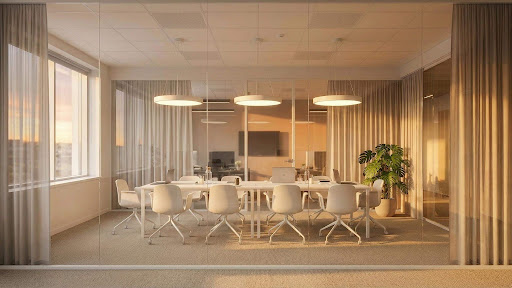
Layered office lighting can support focused work while reducing harsh contrast and unnecessary glare around screens.
Start With Natural Light
Windows should be considered before artificial lighting because daylight changes dramatically throughout the day.
A desk positioned directly in front of a bright window may create strong contrast between the screen and the background. Sitting with a window directly behind the monitor can create similar visual discomfort, while sunlight reflecting across a screen can make detailed work difficult.
Where possible, position desks so daylight comes from the side rather than directly in front or behind the primary working position. Blinds, curtains, or other adjustable window treatments can help manage particularly bright periods without removing natural light completely.
Artificial lighting can then fill the gaps as daylight changes rather than competing with it.
Use Ambient Lighting for General Visibility
The first artificial layer should provide comfortable general illumination across the office.
This may come from ceiling fixtures, recessed lighting, linear pendants, flush-mounted fixtures, or another broad source depending on the architecture of the room.
The aim is not to create maximum brightness. General lighting should make circulation easy and prevent extreme differences between brightly illuminated desks and dark surrounding areas.
People exploring different Office Lighting options should consider light distribution, fixture dimensions, mounting height, ceiling conditions, and the type of work performed in the room rather than relying on appearance alone.
Add Task Lighting Where Detailed Work Happens
Not every desk or activity requires the same amount of light.
Someone working primarily on a computer may need relatively moderate ambient illumination with careful glare control. A person reviewing printed plans, drawing, crafting, or handling small objects may benefit from additional focused task lighting.
Desk lamps, adjustable wall lights, and other localized fixtures allow people to increase illumination where it is actually needed without making the whole office brighter.
This flexibility is especially useful in shared spaces. Different employees may have different preferences, and individual task lighting allows some control without changing conditions for everyone else.
Reduce Glare Around Computer Screens
Glare is one of the most common office lighting problems.
A fixture may provide plenty of light while still being uncomfortable if the brightest part of the lamp is visible directly from the desk. Reflections from glossy desks, glass partitions, and monitors can create similar issues.
Look at the office from the seated working position rather than judging fixtures while standing. Check whether overhead lights reflect in the screen and whether pendant fixtures hang within the natural field of view.
Diffusers, indirect lighting, carefully positioned fixtures, and adjustable blinds can all help reduce glare while maintaining adequate illumination.
Consider Different Zones Within the Office
Modern offices often contain more than rows of desks.
A single workplace may include meeting tables, individual workstations, reception areas, casual seating, video-call spaces, storage zones, and kitchen or break areas. These spaces do not necessarily need identical lighting.
A meeting room may benefit from dimming so presentations can be viewed clearly. A reception area can use more decorative fixtures to establish the character of the business. Break areas can feel warmer and less formal, while workstations require more controlled illumination.
Thinking in zones makes it easier to select the right fixture for each activity rather than applying one lighting solution throughout the entire workplace.
Use Decorative Lighting Without Sacrificing Function
Office lighting does not have to look purely technical.
Pendant lights, wall sconces, and decorative ceiling fixtures can contribute to the identity of a workspace, particularly in reception areas, conference rooms, creative studios, hospitality offices, and client-facing environments.
The key is to keep function in mind. A dramatic fixture above a conference table should still provide suitable light without obstructing views. Decorative pendants above a reception desk should complement the space without producing uncomfortable glare for employees sitting below them.
Lighting retailers such as Dazuma offer a broad range of decorative and functional lighting styles, allowing office planners to compare fixtures that can contribute to both workplace performance and interior design.
Think About Video Calls
Hybrid working has made video-call lighting another important consideration.
A bright window directly behind someone can make their face appear dark on camera, while harsh ceiling lighting may create strong shadows around the eyes. A softer source positioned toward the front or side of the desk can produce a more balanced appearance.
In offices where employees regularly attend virtual meetings, test the lighting using the actual camera setup rather than assuming the room will look the same on screen as it does in person.
This is equally important in home offices, where one workspace may need to support focused work and professional video calls throughout the day.
Choose a Suitable Color Temperature
Color temperature affects the character of the workspace.
Very warm lighting can feel relaxed but may not suit every task-oriented office, while extremely cool illumination can make a workspace feel overly clinical. Many offices work well with a balanced neutral appearance that keeps the environment clear without becoming harsh.
Consistency also matters. If neighboring fixtures produce noticeably different colors of white light, the room can look uncoordinated.
Where offices include lounge or hospitality areas, slightly warmer lighting may be used to distinguish those zones from focused working areas.
Use Controls to Match Lighting to the Working Day
Office lighting needs change throughout the day.
On a bright morning, daylight may provide much of the required illumination near windows. Later in the afternoon, artificial lighting becomes more important. Meeting rooms may be occupied only occasionally, and shared spaces can remain empty for long periods.
Dimming, occupancy sensors, daylight-responsive controls, and separate lighting zones can help the system respond to these changes.
There is little benefit in keeping every fixture at full output when part of the office is empty or already receiving strong natural light.
Do Not Forget the Home Office
The same principles apply when the office is a spare bedroom, study, or corner of a living space.
Home offices are especially likely to rely on one existing ceiling light, which may not have been positioned with desk work in mind. Adding a task lamp, wall-mounted fixture, or more suitable ceiling light can often improve the workspace without requiring a major renovation.
Because home offices are part of a residential interior, fixtures can also be chosen to coordinate with surrounding furniture and décor rather than looking like traditional commercial equipment.
Final Thoughts
Effective office lighting is not about making a workspace as bright as possible. It is about putting the right type of light where people actually need it.
Start with natural daylight, provide comfortable ambient illumination, add task lighting at individual work areas, and control glare around screens. Then consider meeting spaces, reception areas, video calls, decorative fixtures, and smart controls as separate parts of the overall plan.
When lighting responds to the activities taking place in each area, an office can feel more comfortable, more flexible, and better suited to the way people work throughout the day.