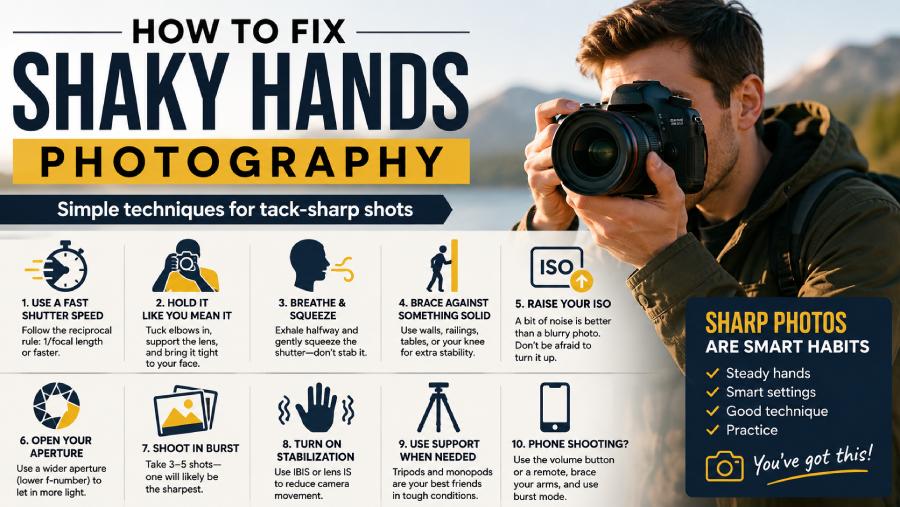
Let me guess. You lined up a beautiful shot, pressed the shutter, felt good about it, and then zoomed in later only to find a soft, smeary mess where crisp detail should have been. Frustrating, right? Here’s the good news: shaky hands are one of the most common reasons photos turn out blurry, and they’re also one of the most fixable. You don’t need surgeon-steady hands or a five-figure gear bag to get sharp images. You need a handful of techniques, a couple of smart settings, and a little practice. I’ve spent years shooting handheld in less-than-ideal conditions, and I can tell you that camera shake is a problem you can absolutely beat. Let’s walk through exactly how.
First, Make Sure It’s Actually Camera Shake
Before you fix anything, you need to know what you’re fixing, because “blurry” can mean a few very different things and each one has a different cure. Camera shake produces a uniform smear across the whole frame, often with little directional streaks following the way your hands moved during the exposure. Compare that to missed focus, where part of the image is razor sharp and another part is soft, or subject motion, where your background is crisp but your moving subject is blurred. The quickest way to diagnose it is to zoom in on a stationary, high-contrast edge like a building corner or a tree branch. If even the things that weren’t moving look smudged, congratulations, you’ve got camera shake, and everything below will help. If only your moving subject is blurry, that’s a shutter-speed-versus-motion issue, which overlaps with some of these fixes but isn’t quite the same beast.
The Reciprocal Rule: Your First Line of Defense
If you remember only one thing from this entire article, make it this. Shutter speed is the single most powerful weapon against shaky hands, and there’s a classic guideline that has saved more photos than any gadget ever invented: the reciprocal rule. It says your shutter speed should be at least one over your focal length. Shooting at 50mm? Stay at 1/50 of a second or faster. At 200mm? You want 1/200 or quicker. The longer the lens, the more it magnifies every tiny tremor, so longer lenses demand faster shutter speeds. Honestly, I’d push past the rule and double it whenever you can, because the original guideline was written for film cameras with far less resolution than today’s sensors. Modern high-megapixel cameras reveal shake that older bodies happily hid, so giving yourself a generous margin is just smart insurance.
Hold Your Camera Like You Actually Mean It
You’d be amazed how many people hold a camera like they’re afraid it might bite them, with elbows flapping out and a loose, nervous grip. Your body is a stabilization system, and most folks never switch it on. Wrap your right hand around the grip and cradle the lens from underneath with your left, palm up, so the weight rests in your hand instead of being pinched between your fingers. Then tuck both elbows tight against your ribcage so your arms form a little tripod against your torso. Bring the camera in close to your face and let the viewfinder press gently against your brow for a third point of contact. Suddenly you’ve turned a wobbly two-point hold into a stable, braced platform. This costs nothing, takes two seconds, and eliminates a shocking amount of shake all on its own.
Breathe Like You’re Taking a Shot at the Range
Marksmen have known this trick forever, and it works just as well for photographers. Your breathing moves your whole upper body, which means it moves your camera, which means it moves your photo. The fix is simple: take a normal breath, let about half of it out, and gently squeeze the shutter during that natural pause before your next inhale. Don’t hold a giant lungful of air and go red in the face, because the tension that creates actually makes you shakier, not steadier. The goal is a calm, relaxed pause. And notice I said “squeeze,” not “stab.” Jabbing at the shutter button jolts the entire camera at the exact worst moment. Roll your fingertip onto the button smoothly the way you’d press a piano key you didn’t want to wake the neighbors with.
Brace Against Something Solid
When your hands just won’t cooperate, stop fighting physics and start borrowing stability from the world around you. The environment is full of free tripods if you train yourself to spot them. Lean your shoulder into a wall, rest the camera or your forearms on a railing, prop your elbows on a tabletop, or kneel and brace against your raised knee. If you’re shooting something low to the ground, the ground itself is the most stable surface in existence, so set the camera right down on it or on a bag. Even pressing the lens barrel against a fence post can turn a hopeless low-light shot into a keeper. I’ve gotten sharp handheld images at absurdly slow shutter speeds simply because I found a doorframe to lean on. Make scanning for support a habit, and you’ll rescue shots you’d otherwise have lost.
Don’t Be Afraid to Crank Your ISO
A lot of photographers treat ISO like it’s radioactive, keeping it pinned at 100 and then wondering why their handheld shots are soft. Here’s the reframe that changes everything: a slightly grainy sharp photo beats a clean blurry one every single time. ISO controls how sensitive your sensor is to light, and bumping it up lets you use the faster shutter speeds that freeze your hand tremor. Yes, high ISO introduces noise, but modern cameras handle it remarkably well, and noise reduction software has gotten genuinely excellent. Nobody ever looks at a tack-sharp photo and complains about a bit of grain, but everyone notices blur instantly. So when the light drops, raise that ISO without guilt. It’s a tool, not a compromise, and learning to trust it will free you up enormously.
Open Up Your Aperture
Aperture is your other lever for buying faster shutter speeds, and it’s worth understanding how the three exposure settings work together as a team. A wider aperture, meaning a lower f-number like f/1.8 or f/2.8, lets a flood of extra light hit the sensor, which in turn allows a quicker shutter. If you’re shooting in dim conditions and your hands are betraying you, opening up the aperture is often the cleanest fix because, unlike ISO, it adds light rather than amplifying noise. The trade-off is a shallower depth of field, so your zone of sharp focus gets thinner, but for portraits and many other subjects that creamy background blur is a feature, not a bug. A bright, fast lens with a wide maximum aperture is one of the best investments you can make if low-light handheld shooting is your nemesis.
Let Burst Mode Pick the Winner for You
Here’s a beautifully lazy trick that genuinely works: when in doubt, fire off a quick burst of three to five frames instead of a single shot. Hand tremor isn’t constant; it ebbs and surges in tiny waves, so over the course of a short burst there’s almost always a moment where your hands are at their steadiest. The very first frame is often the shakiest because the act of pressing the shutter introduces movement, and the last can drift as you relax, which means the middle frames tend to be the sharpest. Shoot the burst, then zoom in during review and keep the cleanest one. This strategy is a lifesaver in marginal light, and it’s the secret weapon for anyone whose hands aren’t naturally rock-steady. You’re playing the odds, and the odds are very much in your favor.
Turn On Your Stabilization (and Know When to Turn It Off)
Modern cameras and lenses come packed with image stabilization technology, and if you’re not using it, you’re leaving free sharpness on the table. In-body image stabilization, often called IBIS, physically shifts the sensor to counteract small movements, while optical stabilization built into lenses does the same by moving lens elements. The best mirrorless systems today can give you several extra stops of usable shutter speed, meaning you can handhold shots that would have been impossible a decade ago. Make sure it’s switched on for handheld work. The one catch worth knowing is that some older stabilization systems can actually fight you when the camera is locked down on a tripod, so the conventional wisdom is to disable it in that situation, though many newer systems detect a tripod automatically. When in doubt, leave it on for handheld and off for sturdy supports.
Know When to Reach for a Tripod or Monopod
Sometimes technique and settings just aren’t enough, and that’s where dedicated support comes in. A tripod is the gold standard for absolute sharpness, and it’s non-negotiable for long exposures, night photography, landscapes where you want everything crisp from front to back, and any situation where you’re stacking or bracketing frames. The trade-off is that tripods are bulky and slow you down, which is why a lot of photographers reach for a monopod instead. A monopod won’t let you walk away from the camera, but it dramatically steadies your shots while keeping you mobile and quick, which makes it perfect for sports, wildlife, events, and travel. Think of these tools not as admissions of defeat but as the right gear for the job. Even the steadiest-handed pro on earth uses a tripod for a thirty-second exposure, because no human hand can hold still that long.
Shooting on Your Phone? The Rules Shift a Little
Phone photography deserves its own mention because the dynamics are slightly different. Phones are light and flat, which makes them weirdly hard to hold steady; there’s no chunky grip to wrap your hand around, and tapping the on-screen shutter jiggles the whole device. The single best phone fix is to stop tapping the screen and instead use the volume button as a shutter release, or better yet, plug in earbuds and use their volume control so you’re not touching the phone at all. Brace your elbows against your body just as you would with a camera, and take advantage of the burst mode that triggers when you hold the shutter down. Modern phones lean heavily on software stabilization and computational tricks to clean things up, but you can help them enormously by simply holding still and giving them a steady starting point to work from.
If You Have an Actual Tremor, You Can Still Shoot Brilliantly
Let’s address something head-on, because it matters. Plenty of people reading this don’t just have occasional jitters; they live with a genuine hand tremor, whether from essential tremor, a neurological condition, medication, or simply getting older. If that’s you, I want you to hear this clearly: a tremor does not disqualify you from making stunning photographs. Loads of working professionals shoot with tremors every day, and their clients never have a clue. The key is to layer your defenses rather than relying on any single fix. Stack them all together: a stabilized camera body as your baseline, fast shutter speeds, a wide aperture, higher ISO, burst mode, and a brace or monopod whenever you can manage one. No one of these has to be perfect, because together they cover for each other. You’re not trying to eliminate the shake; you’re managing it so the camera never records it. That’s a winnable game, and people win it constantly.
Steadiness Is a Skill You Can Build
Here’s something the gear reviews won’t tell you: holding a camera steady is a physical skill, and like any skill it improves dramatically with practice. The first time you try to handhold at a slow shutter speed, you’ll probably struggle, but your body genuinely learns the bracing, the breathing, and the gentle shutter squeeze until they become automatic. Core strength and general fitness help too, because a stronger, more stable torso makes a better camera platform, and fatigue is a major hidden cause of shake. Keep your kit reasonably light for long handheld sessions, because aching arms get shaky fast. Spend some deliberate practice time pushing your shutter speed slower than feels comfortable and see how far you can go while staying sharp. You’ll be surprised how quickly your personal limit drops, and that confidence pays off in every shoot afterward.
When All Else Fails, Fix It in Post
Sometimes you nail the moment but not the sharpness, and the shot is too precious to toss. While prevention always beats correction, modern editing software can rescue more than you’d expect. Subtle camera shake can often be reduced with sharpening and deconvolution tools that intelligently reverse some of the blur, and the latest AI-powered sharpening features have become genuinely impressive at recovering detail that looked lost. For video, dedicated stabilization tools can smooth out wobble after the fact, especially when you shot at a higher frame rate to give the software more data to work with. Just keep your expectations realistic: post-processing can polish a slightly soft image into a usable one, but it can’t conjure detail that the sensor never captured. Treat it as a safety net, not a substitute for getting it right in camera.
FAQs
What shutter speed stops shaky hands?
As a rule of thumb, keep your shutter speed at one over your focal length or faster — so 1/100s for a 100mm lens. If your hands are particularly unsteady, double it. Faster shutter speeds freeze hand tremor before the sensor can record it.
Why are my photos blurry even with steady hands?
If everything in the frame is smeared, it’s still camera shake from too slow a shutter speed. But if only part of the image is soft, you’re likely dealing with missed focus or subject motion instead — different problems with different fixes. Zoom in on a stationary edge to tell them apart.
Can I take sharp photos if I have an essential tremor?
Absolutely. Plenty of working photographers shoot with a tremor and clients never notice. The trick is layering fixes — stabilization, fast shutter, wide aperture, burst mode, and a brace or monopod — so no single one has to be perfect.
How do I hold a phone steady for photos?
Brace your elbows against your body and stop tapping the screen. Use the volume button as a shutter, or trigger it from plugged-in earbuds so you never touch the phone during the shot. Holding still also helps your phone’s software do its job.
Does image stabilization actually fix camera shake?
Yes, and it’s one of the biggest free wins available. IBIS and lens stabilization can buy you several extra stops of handheld shutter speed. Leave it on for handheld shooting, but consider switching it off when you’re locked down on a sturdy tripod.
Conclusion
Shaky hands feel like a curse when you’re staring at yet another blurry photo, but they’re really just a technical problem with a stack of reliable solutions. Start with shutter speed, because nothing else moves the needle as much, and remember the reciprocal rule as your floor rather than your ceiling. Build a solid grip, breathe and squeeze instead of tensing and jabbing, and train your eye to find walls, railings, and knees to lean on. Don’t be precious about ISO or aperture; they exist to be used, and a grainy sharp photo always beats a clean smear. Switch on your stabilization, fire bursts when conditions get marginal, and grab a monopod or tripod when the situation truly calls for it. And if you live with a genuine tremor, take heart, because layering these techniques lets countless photographers produce world-class work, and it can do the same for you. The next time you raise your camera, run through this mental checklist, take the shot, and watch your keeper rate climb. Sharp photos aren’t about perfect hands. They’re about smart habits, and now those habits are yours.